- HTTP
- net.http_get
- net.http_post
- net.http_collect_response
- Enable the extension #
- Syntax #
- Delete data every week #
- Run a vacuum every day #
- Invoke Supabase Edge Function every minute #
- Unschedule a job #
- Signature #
- Usage #
- http_post #
- Signature #
- Usage #
- Invoke a Supabase Edge Function #
- PostgreSQL Functions
- PostgreSQL Triggers
- Supabase Functions
- BYO Functions, zero lock-in
- Timeline
- Database Webhooks (Alpha)
- Hook Events
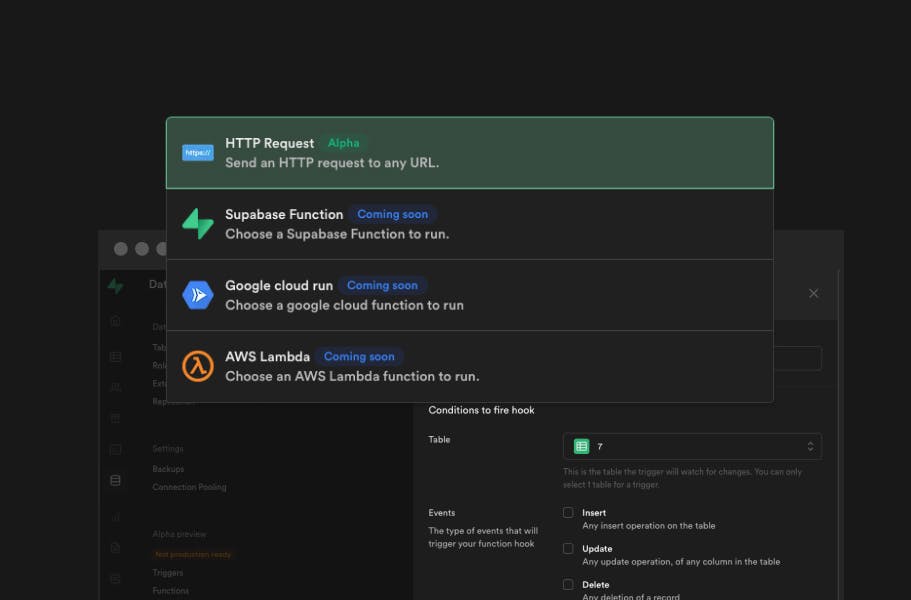
- Hook Targets
- Hook Payload
- Hooks technical design: pg_net v0.1
- Usage
- Implementation
- Database Webhooks is enabled today on all new projects . Find it under Database > Alpha Preview > Database Webhooks.
- Technical Explanation
- POST requests
- Technical Explanation
- Installation
- Enabling the Extension with Supabase
- Local Setup
- Configuring Your Device/Server
- Installing in PostgreSQL
- Requests API
- Monitoring Requests
- Observing a Request’s Response
- Extracting response values
- net.http_get function signature
- Examples:
- Calling an API
- Calling an API with an API-KEY
- net.http_post function signature
- Examples:
- Sending data to an API
- net.http_delete function signature
- Examples:
- Sending a delete request to an API
- Sending a delete request with a row id as a query param
- Sending a delete request with a row id as a path param
- Practical Examples
- Syncing data with an external data source using triggers
- Example Cron job to call serverless function
- Retrying failed requests
- Finding failed requests
- Creating a Request Tracker Table
- Creating a Request Wrapper Function
- Retrying failed requests
- Contributing
- PG_NET
- Contents
- Introduction
- Technical Explanation
- Installation
- Enabling the Extension with Supabase
- Local Setup
- Configuring Your Device/Server
- Installing in PostgreSQL
- Requests API
- Monitoring Requests
- Observing a Request’s Response
- Extracting response values
- GET requests
- net.http_get function signature
- Examples:
- Calling an API
- Calling an API with URL encoded params
- Calling an API with an API-KEY
- net.http_post function signature
- Examples:
- Sending data to an API
- net.http_delete function signature
- Examples:
- Sending a delete request to an API
- Sending a delete request with a row id as a query param
- Sending a delete request with a row id as a path param
- Practical Examples
- Syncing data with an external data source using triggers
- Calling a serverless function every minute with PG_CRON
- Example Cron job to call serverless function
- Retrying failed requests
- Finding failed requests
- Creating a Request Tracker Table
- Creating a Request Wrapper Function
- Retrying failed requests
- Contributing
HTTP
net.http_get
description
Create an HTTP GET request returning the request’s id
HTTP requests are not started until the transaction is committed
signature
usage
net.http_post
description
Create an HTTP POST request with a JSON body, returning the request’s id
HTTP requests are not started until the transaction is committed
the body’s character set encoding matches the database’s server_encoding
setting
signature
usage
net.http_collect_response
description
Given a request_id
reference, retrieve the response.
When async:=false
is set it is recommended that statement_timeout
is set for the maximum amount of time the caller is willing to wait in case the response is slow to populate.
net.http_collect_response
must be in a separate transaction from the calls to net.http_<method>
signature
usage
where response
is a composite
Possible values for net.http_response_result.status
are ('PENDING', 'SUCCESS', 'ERROR')
The pg_cron
extension is a simple cron-based job scheduler for PostgreSQL that runs inside the database.
Enable the extension #
- Go to the Database
page in the Dashboard. - Click on Extensions
in the sidebar. - Search for «pg_cron» and enable the extension.
Syntax #
The schedule uses the standard cron syntax, in which * means «run every time period», and a specific number means «but only at this time»:
┌───────────── min (0 - 59)
│ ┌────────────── hour (0 - 23)
│ │ ┌─────────────── day of month (1 - 31)
│ │ │ ┌──────────────── month (1 - 12)
│ │ │ │ ┌───────────────── day of week (0 - 6) (0 to 6 are Sunday to
│ │ │ │ │ Saturday, or use names; 7 is also Sunday)
│ │ │ │ │
│ │ │ │ │
* * * * *
You can use crontab.guru
to help validate your cron schedules.
Delete data every week #
Delete old data on Saturday at 3:30am (GMT):
select cron.schedule (
'saturday-cleanup', -- name of the cron job
'30 3 * * 6', -- Saturday at 3:30am (GMT)
$ delete from events where event_time < now() - interval '1 week' $
Run a vacuum every day #
Vacuum every day at 3:00am (GMT)
select cron.schedule('nightly-vacuum', '0 3 * * *', 'VACUUM');
Invoke Supabase Edge Function every minute #
Make a POST request to a Supabase Edge Function every minute. Note: this requires the pg_net
extension
to be enabled.
'* * * * *', -- every minute
) as request_id;
Unschedule a job #
Unschedules a job called 'nightly-vacuum'
The pg_net API is in alpha. Functions signatures may change.
pg_net
is a PostgreSQL extension exposing a SQL interface for async networking with a focus on scalability and UX.
- Go to the Database
page in the Dashboard. - Click on Extensions
in the sidebar. - Search for «pg_net» and enable the extension.
Creates an HTTP GET request returning the request’s ID. H TTP requests are not started until the transaction is committed.
Signature #
This is a Postgres SECURITY DEFINER function.
-- url for the request
-- key/value pairs to be url encoded and appended to the `url`
-- key/values to be included in request headers
-- WARNING: this is currently ignored, so there is no timeout
-- the maximum number of milliseconds the request may take before being cancelled
timeout_milliseconds int default 1000
-- request_id reference
Usage #
select net.http_get('https://news.ycombinator.com') as request_id;
After triggering http_get
, use http_get_result
to get the result of the request.
http_post
#
Creates an HTTP POST request with a JSON body, returning the request’s ID. H TTP requests are not started until the transaction is committed.
The body’s character set encoding matches the database’s server_encoding
setting.
Signature #
This is a Postgres SECURITY DEFINER function
-- url for the request
-- body of the POST request
-- key/value pairs to be url encoded and appended to the `url`
-- key/values to be included in request headers
-- WARNING: this is currently ignored, so there is no timeout
-- the maximum number of milliseconds the request may take before being cancelled
timeout_milliseconds int default 1000
-- request_id reference
Usage #
) as request_id;
After triggering http_post
, use http_get_result
to get the result of the request.
Invoke a Supabase Edge Function #
Make a POST request to a Supabase Edge Function with auth header and JSON body payload:
) as request_id;
The question on everyone’s mind — are we launching Supabase Functions? Well, it’s complicated.
Today we’re announcing part
of Functions — Supabase Hooks — in Alpha, for all new
projects.
We’re also releasing support for Postgres Functions and Triggers in our Dashboard, and some timelines for the rest of Supabase Functions.
Let’s cover the features we’re launching today before the item that everyone is waiting for: Supabase Functions.
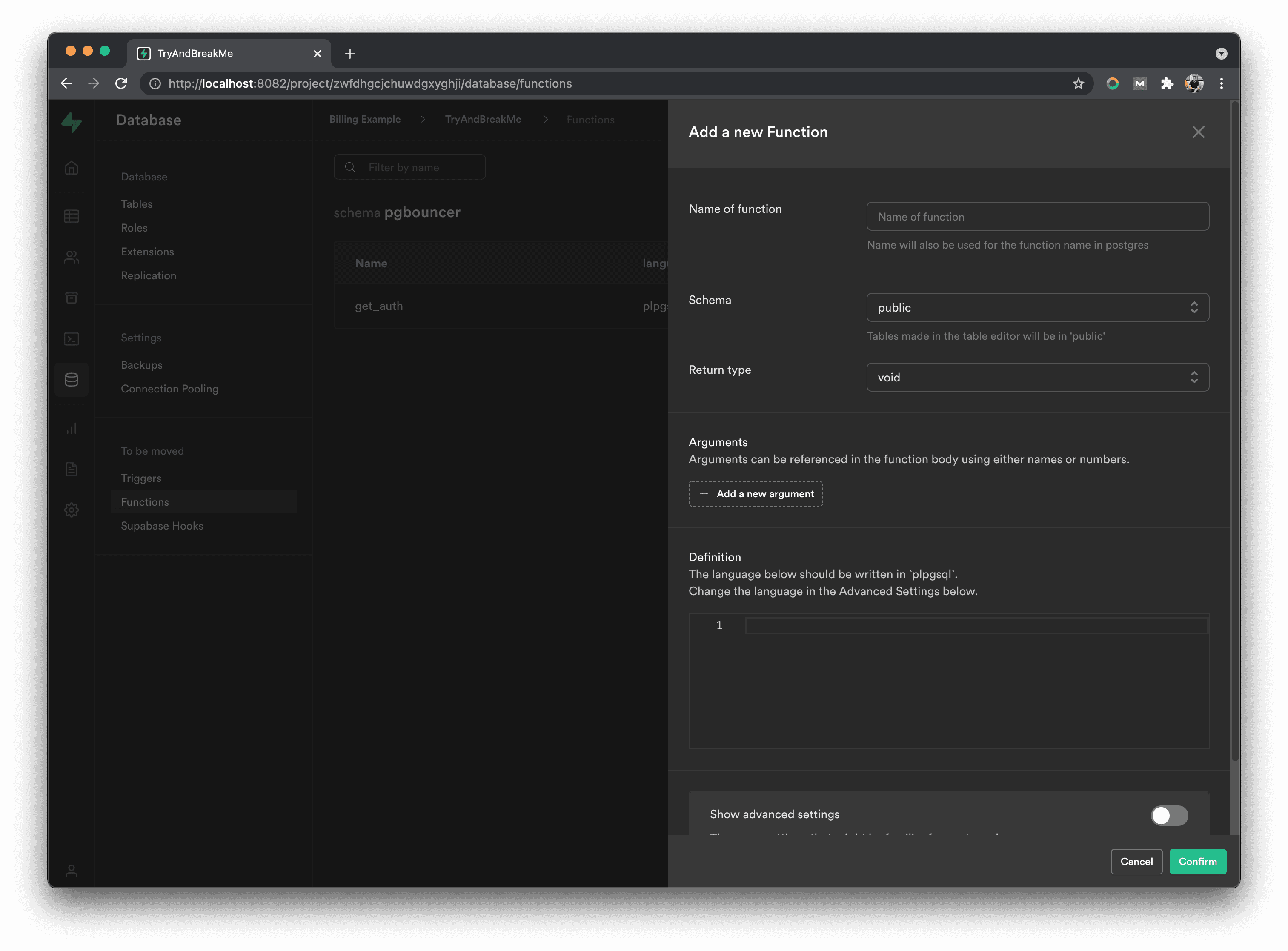
PostgreSQL Functions
(Not to be confused with Supabase Functions!)
Postgres has built-in support for SQL functions
. Today we’re making it even easier for developers to build PostgreSQL Functions by releasing a native Functions editor. Soon we’ll release some handy templates!
name: 'The Prequels',
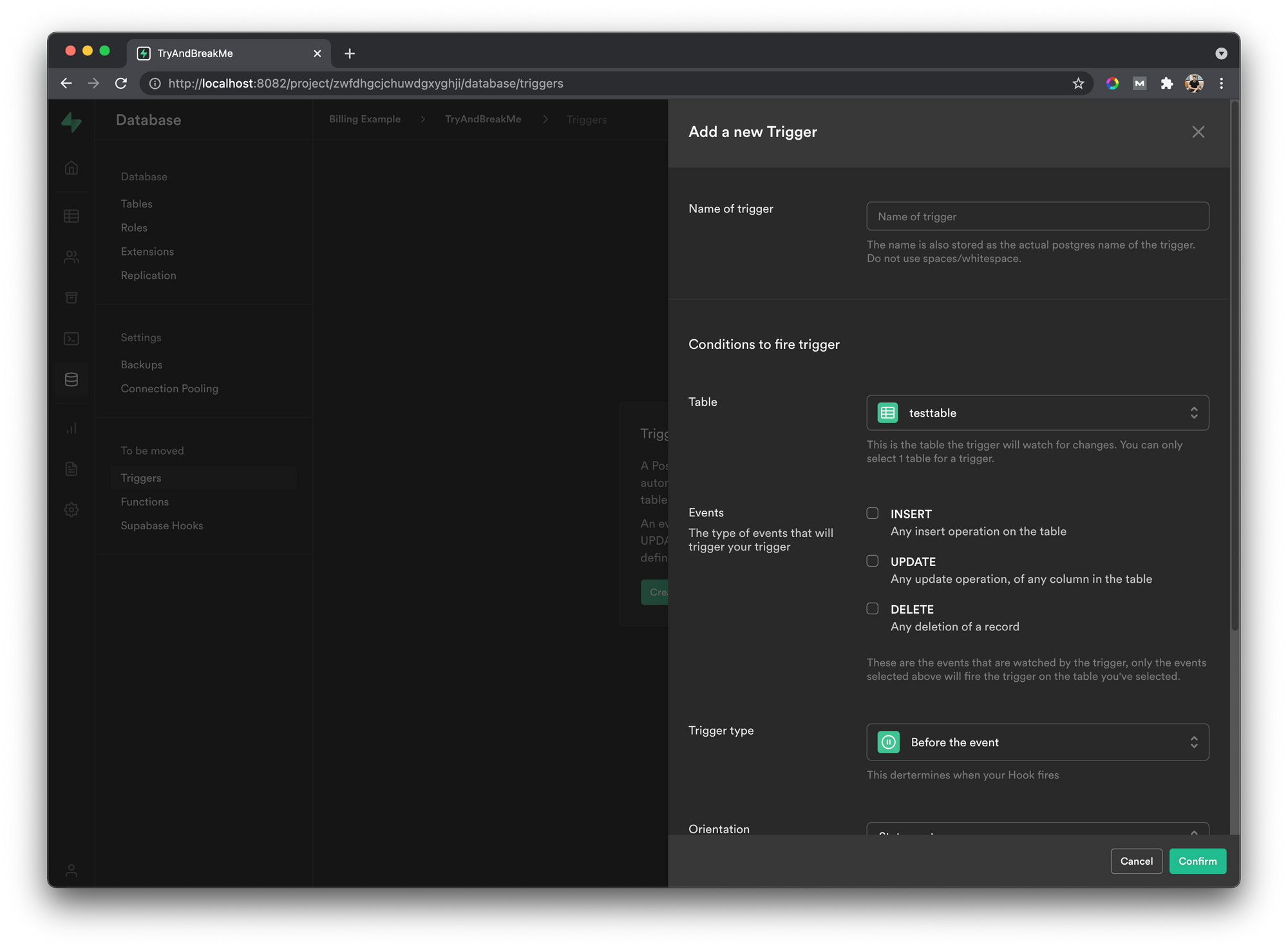
PostgreSQL Triggers
Triggers
are another amazing feature of Postgres, which allows you to execute any SQL code after inserting, updating, or deleting data.
Supabase Functions
They say building a startup is like jumping off a cliff and assembling the plane on the way down. At Supabase it’s more like assembling a 747 since, although we’re still in Beta, thousands of companies depend on us to power their apps and websites.
For the past few months we’ve been designing Supabase Functions based on our customer feedback.
BYO Functions, zero lock-in
A recurring request from our customers is the ability to trigger their existing
Functions.
This is especially true for our Enterprise customers, but also Jamstack developers who develop API Functions directly within their stack (like Next.js API routes
, or Redwood Serverless Functions
).
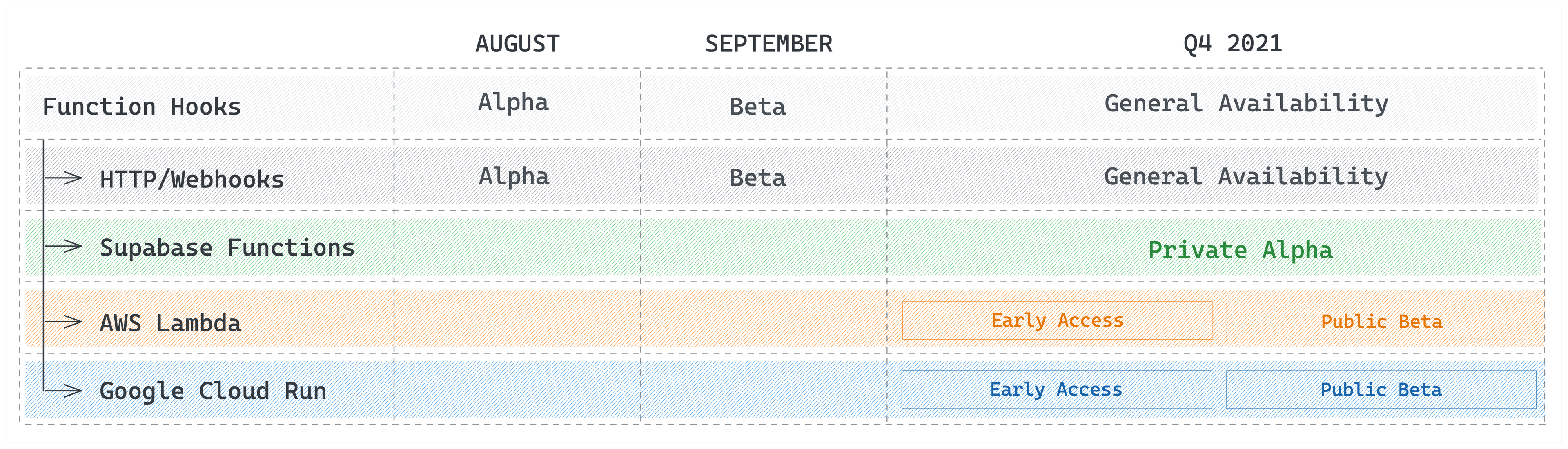
Timeline
To meet these goals, we’re releasing Supabase Functions in stages:
- Stage 1:
Give developers the ability to trigger external HTTP functions — today, using Database Webhooks. - Stage 2:
Give developers the ability to trigger their own Serverless functions on AWS and GCP — Q4 2021. - Stage 3:
Release our own Serverless Functions (Supabase Functions) — Q4 for Early Preview customers.
Database Webhooks (Alpha)
(Note: Database Webhooks were previously called «Function Hooks»)
Today we’re releasing Functions Hooks in ALPHA
. The ALPHA
tag means that it is NOT stable, but it’s available for testing and feedback. The API will change, so do not use it for anything critical. You have been warned.
Hooks? Triggers? Firestore has the concept of Function Triggers
, which are very cool.
Supabase Hooks are the same concept, just with a different name.
Postgres already has the concept of Triggers
, and we thought this would be less confusing 1
.
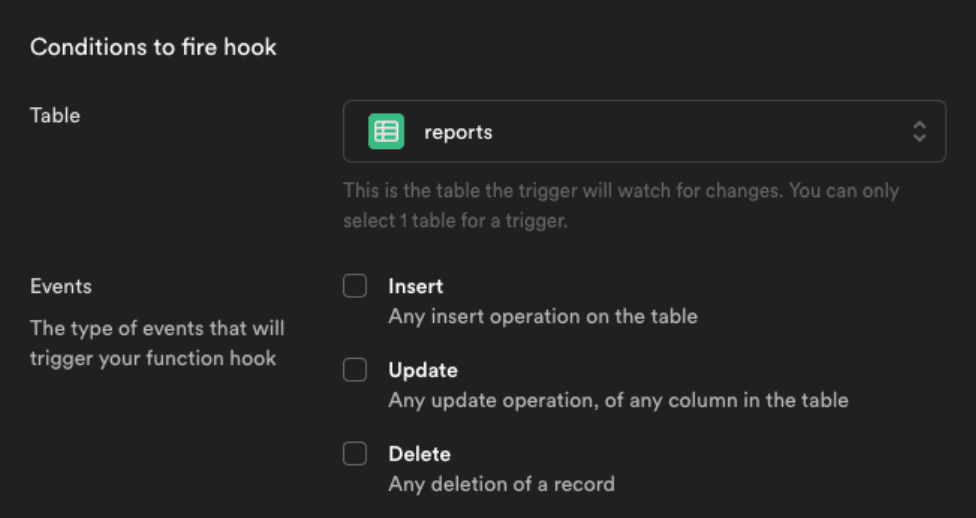
Hook Events
Database Webhooks allow you to «listen» to any change in your tables to trigger an asynchronous Function. You can hook into a few different events: INSERT
, UPDATE
, and DELETE
. All events are fired after
a database row is changed. Keen eyes will be able to spot the similarity to Postgres triggers, and that’s because Database Webhooks are just a convenience wrapper around triggers.
Hook Targets
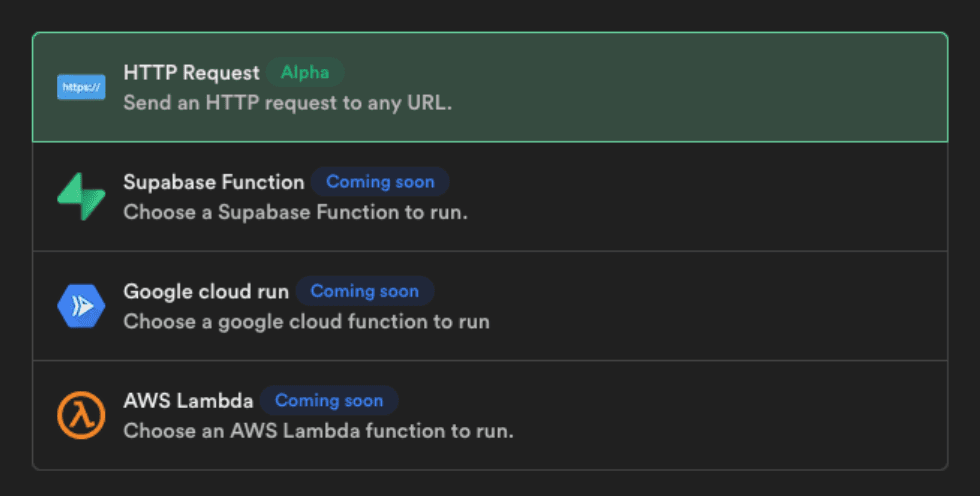
Supabase will support several different targets.
- HTTP/Webhooks: Send HTTP requests directly from your Postgres Database.
- AWS Lambda/Google Cloud Run: Provide Supabase with a restricted IAM role to trigger Serverless functions natively.
- Supabase Functions: We’ll develop an end-to-end experience.
Hook Payload
If the target is a Serverless function or an HTTP POST
request, the payload is automatically generated from the underlying table data. The format matches Supabase Realtime
, except in this case you don’t a client to «listen» to the changes. This provides yet another mechanism for responding to database changes.
Hooks technical design: pg_net v0.1
As with most of the Supabase platform, we leverage PostgreSQL’s native functionality to implement Database Webhooks (previously called «Function Hooks»).
To build hooks, we’ve released a new PostgreSQL Extension, pg_net
, an asynchronous networking extension with an emphasis on scalability/throughput. In its initial (unstable) release we expose:
- asynchronous HTTP
GET
requests. - asynchronous HTTP
POST
requests with a JSON payload.
The extension is (currently) capable of >300 requests per second and is the networking layer underpinning Database Webhooks. For a complete view of capabilities, check out the docs
.
Usage
pg_net
allows you to make asynchronous HTTP requests directly within your SQL queries.
-- Make a request
-- Immediately returns a response ID
After making a request, the extension will return an ID. You can use this ID to collect a response.
-- Collect the response from a request
-- Results (1 row)
SUCCESS ok (
status_code := 200,
You can cast the response to JSON within PostgreSQL:
-- Collect the response json payload from a request
Implementation
To build asynchronous behavior, we use a PostgreSQL background worker
with a queue
. This, coupled with the libcurl multi interface
, enables us to do multiple simultaneous requests in the same background worker process.
Shout out to Paul Ramsey
, who gave us the implementation idea in pgsql-http
. While we originally hoped to add background workers to his extension, the implementation became too cumbersome and we decided to start with a clean slate. The advantage of being async can be seen by making some requests with both extensions:
POST
Of course, the sync version waits until each request is completed to return the result, taking around 3.5 seconds for 10 requests; while the async version returns almost immediately in 1.5 milliseconds. This is really important for Supabase hooks, which run requests for every event fired from a SQL trigger — potentially thousands of requests per second.
Future/Roadmap pg_net v0.1
This is only the beginning! First we’ll thoroughly test it and make a stable release, then we expect to add support for
the remaining HTTP methods (
/
synchronous HTTP GET
POST more throughput (using epoll)
Get started today
Database Webhooks is enabled today on all new projects
. Find it under Database > Alpha Preview > Database Webhooks.
pg_net
PG_NET
-- key/values to be included in request headers
Contents
Introduction
Technical Explanation
Installation ALPHA
ALPHA
Requests API
GET requests
POST requests
DELETE requests
INSERT DELETE Practical Examples
Syncing data with an external data source using triggers
Calling a serverless function every minute with PG_CRON
Retrying failed requests
UPDATE
Contributing
Introduction
The PG_NET extension enables PostgreSQL to make asynchronous HTTP/HTTPS requests in SQL. It eliminates the need for servers to continuously poll for database changes and instead allows the database to proactively notify external resources about significant events. It seamlessly integrates with triggers, cron jobs (e.g., PG_CRON
), and procedures, unlocking numerous possibilities. Notably, PG_NET powers Supabase’s Webhook functionality, highlighting its robustness and reliability.
Common use cases for the PG_NET extension include:
- Calling external APIs
- Syncing data with outside resources
- Calling a serverless function when an event, such as an insert, occurred
However, it is important to note that the extension has a few limitations. Currently, it only supports three types of asynchronous requests:
- async http GET requests
- async http POST requests with a JSON
payload - async http DELETE requests
Ultimately, though, PG_NET offers developers more flexibility in how they monitor and connect their database with external resources.
Technical Explanation
http_request_queue
: This table serves as a queue for requests waiting to be executed. Upon successful execution of a request, the corresponding data is removed from the queue.The SQL statement to create this table is:
  CREATE UNLOGGED TABLE
 .  (
 id DEFAULT nextval(::regclass),
 method ,
 url ,
 headers jsonb ,
 body ,
 timeout_milliseconds
 )
_http_response
: This table holds the responses of each executed request.The SQL statement to create this table is:
  CREATE UNLOGGED TABLE
 .  (
 id ,
 status_code ,
 content_type ,
 headers jsonb ,
 content ,
 timed_out ,
 error_msg ,
 created    timestamp with time zone
 DEFAULT now()
 )
When any of the three request functions ( http_get
, http_post
, http_delete
) are invoked, they create an entry in the net.http_request_queue
table.
The extension employs C’s libCurl
library within a PostgreSQL background worker
to manage HTTP requests. This background worker regularly checks the http_request_queue
table and executes the requests it finds there.
Once a response is received, it gets stored in the _http_response
table. By monitoring this table, you can keep track of response statuses and messages.
Installation
Enabling the Extension with Supabase
- Navigate to the ‘Database’ page.
- Select ‘Extensions’ from the sidebar.
- Search for «pg_net» and enable the extension.
Local Setup
Configuring Your Device/Server
Clone this repo and run
To make the extension available to the database add on postgresql.conf
:
shared_preload_libraries = 'pg_net'
Installing in PostgreSQL
To activate the extension in PostgreSQL, run the create extension command. The extension creates its own schema named net to avoid naming conflicts.
Requests API
Monitoring Requests
When you call a request function (http_get, http_post, http_delete), the function will return a request_id immediately. You can use this request_id with the net._http_collect_response function to check the results of your request. This function returns a custom type _net.http_response_result* that has three columns:
- response
: This is an aggregate of the response’s status_code (integer), headers (JSONB), and body (text). - status
: This value indicates the execution status of the request itself, which can be either ‘PENDING’, ‘SUCCESS’, or ‘ERROR’. It’s important not to confuse this status with the HTTP status code of the response (like 200 for ‘OK’, 404 for ‘Not Found’, etc.) that is found in the response column - message
: This contains the response’s message as text.
Observing a Request’s Response
Extracting response values
net.http_get function signature
  .(
    url for the request

 url ,
    key/value pairs to be url encoded and appended to the `url`

 params jsonb default ::jsonb,
    key/values to be included in request headers

 headers jsonb default ::jsonb,
    the maximum number of milliseconds the request may take before being cancelled

 timeout_milliseconds default
)
    request_id reference

 returns

 strict
 volatile
 parallel safe
 language plpgsql
Examples:
Calling an API
  .  (

) request_id;
Calling an API with URL encoded params.( , The "!" is url-encoded as %21 ::JSONB ) request_id;Calling an API with an API-KEY
POST requestsnet.http_post function signature
  .(
    url for the request

 url ,
    body of the POST request

 body jsonb default ::jsonb,
    key/value pairs to be url encoded and appended to the `url`

 params jsonb default ::jsonb,
    key/values to be included in request headers

 headers jsonb default ::jsonb,
    the maximum number of milliseconds the request may take before being cancelled

 timeout_milliseconds default
)
    request_id reference

 returns

 volatile
 parallel safe
 language plpgsql
Examples:
Sending data to an API
Sending single table row as a payloadNOTE: If multiple rows are sent using this method, each row will be sent as a separate request.
Sending multiple table rows as a payloadWARNING: when sending multiple rows, be careful to limit your payload size.
DELETE requestsnet.http_delete function signature
  .(
    url for the request

 url ,
    key/value pairs to be url encoded and appended to the `url`

 params jsonb default ::jsonb,
    key/values to be included in request headers

 headers jsonb default ::jsonb,
    the maximum number of milliseconds the request may take before being cancelled

 timeout_milliseconds default
)
    request_id reference

 returns

 strict
 volatile
 parallel safe
 language plpgsql
 security definer
Examples:
Sending a delete request to an API
  .(

) request_id;
Sending a delete request with a row id as a query param
  WITH selected_id (

 id
 target_table
    if not limited, it will make a delete request for each returned row

)

 .(
 ::,
 format(, id)::JSONB
 ) request_id
 selected_id;
Sending a delete request with a row id as a path param
  WITH selected_id (

 id
 target_table
    if not limited, it will make a delete request for each returned row

)

 .(
 id
 ) request_id
 selected_row
Practical Examples
Syncing data with an external data source using triggers
Calling a serverless function every minute with PG_CRONThe PG_CRON
extension enables PostgreSQL to become its own cron server. With it you can schedule regular calls to activate serverless functions.Example Cron job to call serverless function
::JSONB ) request_id; $ );Retrying failed requests
Every request made is logged within the net._http_response table. To identify failed requests, you can execute a query on the table, filtering for requests where the status code is 500 or higher.
Finding failed requests
While the net._http_response table logs each request, it doesn’t store all the necessary information to retry failed requests. To facilitate this, we need to create a request tracking table and a wrapper function around the PG_NET request functions. This will help us store the required details for each request.Creating a Request Tracker Table
  (
 method ,
 url ,
 params JSONB,
 body JSONB,
 headers JSONB,
 request_id
)
Below is a function called request_wrapper, which wraps around the PG_NET request functions. This function records every request’s details in the request_tracker table, facilitating future retries if needed.
Creating a Request Wrapper Function
    CREATE OR REPLACE
 (
 method ,
 url ,
 params JSONB DEFAULT ::JSONB,
 body JSONB DEFAULT ::JSONB,
 headers JSONB DEFAULT ::JSONB
)
RETURNS
 $
DECLARE
 request_id ;


 IF method THEN
 .(
 url:url,
 params:params,
 headers:headers
 ) INTO request_id;
 ELSIF method THEN
 .(
 url:url,
 body:body,
 params:params,
 headers:headers
 ) INTO request_id;
 ELSIF method THEN
 .(
 url:url,
 params:params,
 headers:headers
 ) INTO request_id;
 ELSE
 RAISE EXCEPTION    Method must be DELETE, POST, or GET
;
 END IF;

 request_tracker (method, url, params, body, headers, request_id)
 (method, url, params, body, headers, request_id);

 RETURN request_id;
END;
$
LANGUAGE plpgsql;
Retrying failed requests
The above function can be called using cron jobs or manually to retry failed requests. It may also be beneficial to clean the request_tracker table in the process.Contributing
PG_NET\n\n\n\n
\n
Contents\n
\n
- Introduction
\n
- Technical Explanation
\n
- Installation
\n
- Requests API
\n\n
- Monitoring requests
\n
- GET requests
\n
- POST requests
\n
- DELETE requests
\n
\n
\n
- Practical Examples
\n\n
- Syncing data with an external data source using triggers
\n
- Calling a serverless function every minute with PG_CRON
\n
- Retrying failed requests
\n
\n
\n
- Contributing
\n
\n
\n
Introduction\n
The PG_NET extension enables PostgreSQL to make asynchronous HTTP/HTTPS requests in SQL. It eliminates the need for servers to continuously poll for database changes and instead allows the database to proactively notify external resources about significant events. It seamlessly integrates with triggers, cron jobs (e.g., PG_CRON
), and procedures, unlocking numerous possibilities. Notably, PG_NET powers Supabase’s Webhook functionality, highlighting its robustness and reliability.\n
Common use cases for the PG_NET extension include:
\n
\n
- Calling external APIs
\n
- Syncing data with outside resources
\n
- Calling a serverless function when an event, such as an insert, occurred
\n
\n
However, it is important to note that the extension has a few limitations. Currently, it only supports three types of asynchronous requests:
\n
\n
- async http GET requests
\n
- async http POST requests with a JSON
payload\n
- async http DELETE requests
\n
\n
Ultimately, though, PG_NET offers developers more flexibility in how they monitor and connect their database with external resources.
\n
\n
Technical Explanation\n\n
\n
- \n
http_request_queue
: This table serves as a queue for requests waiting to be executed. Upon successful execution of a request, the corresponding data is removed from the queue.\n
The SQL statement to create this table is:
\n
CREATE UNLOGGED TABLE\n . (\n id DEFAULT nextval(::regclass),\n method ,\n url ,\n headers jsonb ,\n body ,\n timeout_milliseconds \n )\n
\n
- \n
_http_response
: This table holds the responses of each executed request.\n
The SQL statement to create this table is:
\n
  CREATE UNLOGGED TABLE\n .  (\n id ,\n status_code ,\n content_type ,\n headers jsonb ,\n content ,\n timed_out ,\n error_msg ,\n created    timestamp with time zone
 DEFAULT now()\n )
\n
\n
\n
When any of the three request functions (
http_get
,http_post
,http_delete
) are invoked, they create an entry in thenet.http_request_queue
table.\n
The extension employs C’s libCurl
library within a PostgreSQL background worker
to manage HTTP requests. This background worker regularly checks thehttp_request_queue
table and executes the requests it finds there.\n
Once a response is received, it gets stored in the
_http_response
table. By monitoring this table, you can keep track of response statuses and messages.\n
\n
Installation\n
Enabling the Extension with Supabase\n\n
\n
- Navigate to the ‘Database’ page.
\n
- Select ‘Extensions’ from the sidebar.
\n
- Search for \»pg_net\» and enable the extension.
\n
\n
Local Setup\n
Configuring Your Device/Server\n
Clone this repo and run
\n\n
To make the extension available to the database add on
postgresql.conf
:\n
shared_preload_libraries = 'pg_net'\n\n\n
pg_net.database_name = '<dbname>';\n\n
Using pg_net on multiple databases in a cluster is not supported.
\n
Installing in PostgreSQL\n
To activate the extension in PostgreSQL, run the create extension command. The extension creates its own schema named net to avoid naming conflicts.
\n
create extension pg_net;\n\n
\n
Requests API\n
Monitoring Requests\n
When you call a request function (http_get, http_post, http_delete), the function will return a request_id immediately. You can use this request_id with the net._http_collect_response function to check the results of your request. This function returns a custom type _net.http_response_result* that has three columns:
\n
\n
- response
: This is an aggregate of the response’s status_code (integer), headers (JSONB), and body (text).\n
- status
: This value indicates the execution status of the request itself, which can be either ‘PENDING’, ‘SUCCESS’, or ‘ERROR’. It’s important not to confuse this status with the HTTP status code of the response (like 200 for ‘OK’, 404 for ‘Not Found’, etc.) that is found in the response column\n
- message
: This contains the response’s message as text.\n
\n
Observing a Request’s Response\n
\n message,\n response,\n status\n\n .(response_id);\n
\n
WARNING: Although the status column can be ‘PENDING’, ‘SUCCESS’, or ‘ERROR’, there is a bug that makes all ‘PENDING’ requests displayed as ‘ERROR’.
\n
\n\n
Extracting response values\n
  \n ,\n (response).status_code,\n (response).headers,\n (response).body\n    Individual headers and values from the body can be extracted
\n (((response).body::JSON)) some_value\n\n .(request_id);
\n
GET requests\n
net.http_get function signature\n
  .(\n    url for the request
\n url ,\n    key/value pairs to be url encoded and appended to the `url`
\n params jsonb default ::jsonb,\n    key/values to be included in request headers
\n headers jsonb default ::jsonb,\n    the maximum number of milliseconds the request may take before being cancelled
\n timeout_milliseconds default \n)\n    request_id reference
\n returns \n\n strict\n volatile\n parallel safe\n language plpgsql
\n
Examples:\n\n
Calling an API\n
. (\n \n) request_id;\n
\n\n
\n ,\n ((response).body::JSON) args\n\n .(response_id);\n
\n
Calling an API with URL encoded params\n
  .(\n ,\n \n    The \"!\" is url-encoded as %21
\n ::JSONB\n) request_id;
\n
Calling an API with an API-KEY\n
POST requests\n
net.http_post function signature\n
  .(\n    url for the request
\n url ,\n    body of the POST request
\n body jsonb default ::jsonb,\n    key/value pairs to be url encoded and appended to the `url`
\n params jsonb default ::jsonb,\n    key/values to be included in request headers
\n headers jsonb default ::jsonb,\n    the maximum number of milliseconds the request may take before being cancelled
\n timeout_milliseconds default \n)\n    request_id reference
\n returns \n\n volatile\n parallel safe\n language plpgsql
\n
Examples:\n\n
Sending data to an API\n
Sending single table row as a payload\n
\n
NOTE: If multiple rows are sent using this method, each row will be sent as a separate request.
\n
\n
Sending multiple table rows as a payload\n
\n
WARNING: when sending multiple rows, be careful to limit your payload size.
\n
\n
DELETE requests\n
net.http_delete function signature\n
  .(\n    url for the request
\n url ,\n    key/value pairs to be url encoded and appended to the `url`
\n params jsonb default ::jsonb,\n    key/values to be included in request headers
\n headers jsonb default ::jsonb,\n    the maximum number of milliseconds the request may take before being cancelled
\n timeout_milliseconds default \n)\n    request_id reference
\n returns \n\n strict\n volatile\n parallel safe\n language plpgsql\n security definer
\n
Examples:\n\n
Sending a delete request to an API\n
.(\n \n) request_id;\n
Sending a delete request with a row id as a query param\n
  WITH selected_id (\n \n id\n target_table\n    if not limited, it will make a delete request for each returned row
\n)\n\n .(\n ::,\n format(, id)::JSONB\n ) request_id\n selected_id;
\n
Sending a delete request with a row id as a path param\n
  WITH selected_id (\n \n id\n target_table\n    if not limited, it will make a delete request for each returned row
\n)\n\n .(\n id\n ) request_id\n selected_row
\n
\n
Practical Examples\n
Syncing data with an external data source using triggers\n\n
    Create the function to delete the record from Typesense
\n    CREATE OR REPLACE
 ()\n RETURNS TRIGGER\n LANGUAGE plpgSQL\n $\n\n .(\n url : format(, .),\n headers : \n )\n RETURN OLD;\nEND $;\n\n    Create the trigger that calls the function when a record is deleted from the products table
\n \n AFTER .\n FOR EACH ROW\n EXECUTE FUNCTION delete_products();
\n
Calling a serverless function every minute with PG_CRON\n
The PG_CRON
extension enables PostgreSQL to become its own cron server. With it you can schedule regular calls to activate serverless functions.\n
\n\n\n
\n
Example Cron job to call serverless function\n
\n \t\t \"Authorization\": \"Bearer <TOKEN>\" \n::JSONB\n\t ) request_id;\n\t$\n);\n
Retrying failed requests\n
Every request made is logged within the net._http_response table. To identify failed requests, you can execute a query on the table, filtering for requests where the status code is 500 or higher.
\n
Finding failed requests\n
\n \n .\n status_code ;\n
While the net._http_response table logs each request, it doesn’t store all the necessary information to retry failed requests. To facilitate this, we need to create a request tracking table and a wrapper function around the PG_NET request functions. This will help us store the required details for each request.
\n
Creating a Request Tracker Table\n
(\n method ,\n url ,\n params JSONB,\n body JSONB,\n headers JSONB,\n request_id \n)\n
Below is a function called request_wrapper, which wraps around the PG_NET request functions. This function records every request’s details in the request_tracker table, facilitating future retries if needed.
\n
Creating a Request Wrapper Function\n
    CREATE OR REPLACE
 (\n method ,\n url ,\n params JSONB DEFAULT ::JSONB,\n body JSONB DEFAULT ::JSONB,\n headers JSONB DEFAULT ::JSONB\n)\nRETURNS \n $\nDECLARE\n request_id ;\n\n\n IF method THEN\n .(\n url:url,\n params:params,\n headers:headers\n ) INTO request_id;\n ELSIF method THEN\n .(\n url:url,\n body:body,\n params:params,\n headers:headers\n ) INTO request_id;\n ELSIF method THEN\n .(\n url:url,\n params:params,\n headers:headers\n ) INTO request_id;\n ELSE\n RAISE EXCEPTION    Method must be DELETE, POST, or GET
;\n END IF;\n\n request_tracker (method, url, params, body, headers, request_id)\n (method, url, params, body, headers, request_id);\n\n RETURN request_id;\nEND;\n$\nLANGUAGE plpgsql;
\n\n
Retrying failed requests\n
WITH retry_request (\n \n .,\n .,\n .,\n .,\n .,\n .\n request_tracker\n . .id .\n .status_code \n \n),\nretry (\n \n request_wrapper(., ., ., ., .)\n retry_request\n),\ndelete_http_response (\n .\n id ( request_id retry_request)\n RETURNING \n)\n request_tracker\n request_id ( request_id retry_request)\nRETURNING ;\n
The above function can be called using cron jobs or manually to retry failed requests. It may also be beneficial to clean the request_tracker table in the process.
\n
Contributing\n\n
Служба психологической поддержки Служба психологической